Objective
In modern environments it’s common to encounter critical systems that lack native support for syslog forwarding. Yet these systems often hold high-value data essential to both detection and response. Despite being critical to daily operations, they generate unstructured or inaccessible data, leaving security teams with blind spots across their infrastructure.
As security operations centers mature, one practice gaining traction is the development of custom-built data pipelines. These pipelines don’t just enable ingestion from unconventional sources. They provide an opportunity to enrich the data before it hits the SIEM or SOAR.
By layering in cyber threat intelligence and environmental context, we increase the fidelity and actionability of each record. That enrichment improves correlation logic and ensures the data arrives normalized, consistent, and ready for advanced detection workflows.
This lab is a working demonstration of that idea: a lightweight, modular pipeline that ingests logs from a Microsoft SQL Server database, enriches records using VirusTotal threat intelligence, and forwards the results to Splunk via syslog.
Repository: github.com/eric-cyber-git/data-pipeline
Setup
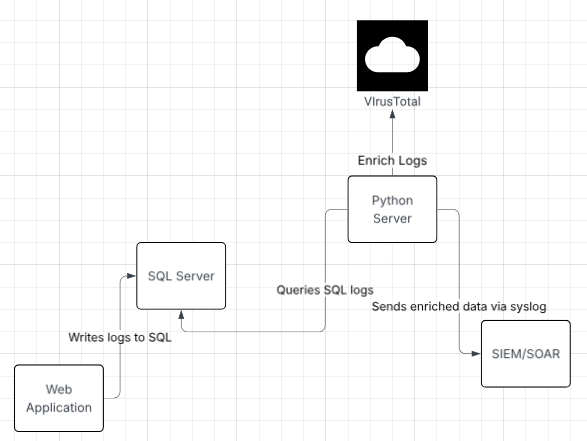
The pipeline operates as follows:
- A web application writes logs to a SQL Server.
- A Python server periodically queries for new logs.
- Each log is enriched using VirusTotal and internal IP frequency analysis.
- Enriched records are forwarded to a SIEM/SOAR platform via syslog.
Project structure
main.py                     # Entry point for executing the pipeline
functions/
├── sql_extract.py          # SQL fetch logic & DB abstraction
├── enrich.py               # IP enrichment logic
├── send_logs.py            # Syslog output module
├── utils.py                # Checkpoint file management
└── virus_total_api.py      # VirusTotal API integration
config/
└── checkpoint.json         # Tracks last processed log_id
Prerequisites
- Python 3.9+
- A local Microsoft SQL Server with a
web_applicationtable - Splunk, or any syslog-compatible listener
- A VirusTotal API key
pip install pyodbc requestsSet your key in the environment before running:
VT_API_KEY="your_virustotal_api_key"Implementation
Step 1: Locate the data
Most legacy applications already have internal logs or audit trails sitting in a database. The first step is to investigate the available tables and work out which fields are useful for your use case.
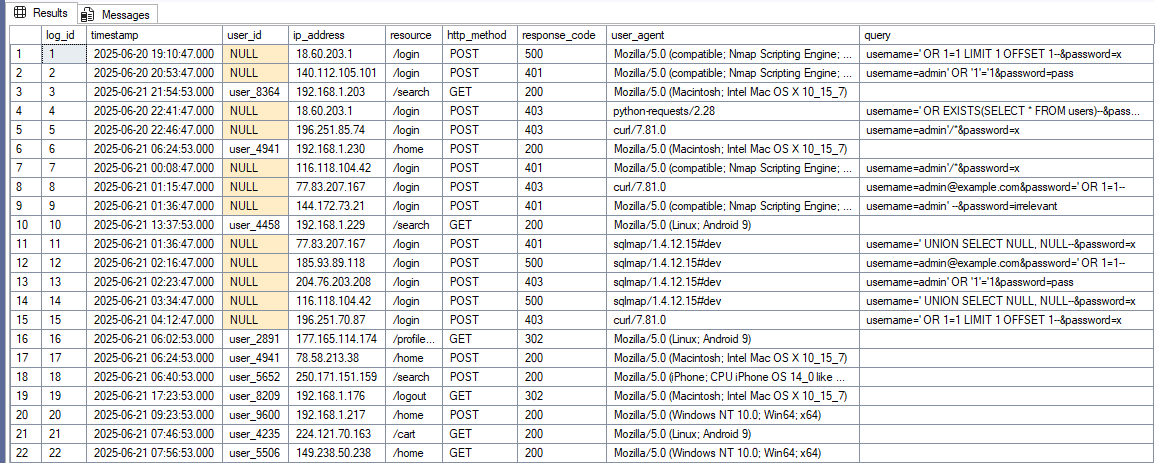
For this lab I built a table simulating log data from a web application, containing both legitimate and malicious traffic modeled on the OWASP Top 10.
Step 2: Extract and transform
With the data located, the next step is extraction. Here you write your SELECT statement and
configure Python to make the call and handle the SQL Server’s response.
The query returns every row written to the database since the last read the program performed.
Checkpointing on log_id is what keeps the pipeline idempotent:
def fetch_new_logs(checkpoint):
    """Fetch all logs with log_id greater than the provided checkpoint."""
    query = f'SELECT * FROM dbo.web_application WHERE log_id > {checkpoint};'
    return DB_Execute(query)


def DB_Execute(passed_query):
    """Executes a SELECT statement and returns the result as a list of dictionaries."""
    conn = pyodbc.connect(
        "DRIVER={ODBC Driver 18 for SQL Server};"
        "SERVER=localhost;"
        "DATABASE=Github_db;"
        "Trusted_Connection=yes;"
        "TrustServerCertificate=yes;"
    )
    cursor = conn.cursor()
    cursor.execute(passed_query)
    rows = cursor.fetchall()
    return rows_to_dict(cursor, rows)
What comes back is a pyodbc.Row object, which isn’t much use as-is:
# Sample output of a SQL call using python:
[(67, datetime.datetime(2025, 6, 21, 23, 3, 47), None,
 '204.76.203.208', '/login', 'POST', 500, 'python-requests/2.28',
 "username=anything' OR 'x'='x&password=123")]
A small helper reshapes it using the cursor’s column headers:
def rows_to_dict(cursor, rows):
    """Convert pyodbc rows into a list of dictionaries using column headers."""
    columns = [col[0] for col in cursor.description]
    return [dict(zip(columns, row)) for row in rows]
The output leaves us with a dictionary that is structured, easily turned into a JSON object, and, most importantly, consistent:
# Sample output after transforming the data:
[
  {'log_id': 67,
   'timestamp': datetime.datetime(2025, 6, 21, 23, 3, 47),
   'user_id': None,
   'ip_address': '204.76.203.208',
   'resource': '/login',
   'http_method': 'POST',
   'response_code': 500,
   'user_agent': 'python-requests/2.28',
   'query': "username=anything' OR 'x'='x&password=123"}
]
Step 3: Enrich the data
Now that the data is structured, it’s time to add external and internal context.
Since we’re dealing with web application logs, IP addresses are the ideal enrichment target. I use VirusTotal’s public API to check for known malicious activity, and I also analyze behavioral patterns such as access frequency, useful for spotting credential stuffing or scanning.
After retrieval, the enrichment data is merged back into the dictionary:
{
  "log_id": 67,
  "timestamp": "2025-06-21 23:03:47",
  "user_id": null,
  "ip_address": "204.76.203.208",
  "resource": "/login",
  "http_method": "POST",
  "response_code": 500,
  "user_agent": "python-requests/2.28",
  "query": "username=anything' OR 'x'='x&password=123",
  "ip_hit_count": 2,
  "Malicious_Score": 10,
  "Harmless_Score": 54,
  "Suspicious_Score": 3,
  "Undetected_Score": 27,
  "ASN": 51396,
  "Country": "NL",
  "Network": "204.76.203.0/24",
  "Regional_Internet_Registry": "RIPE NCC",
  "First_Seen": null,
  "Last_Modified": 1750632245
}
Rate limiting The VirusTotal public API is capped at four requests per minute, so the script includes a
time.sleep(15)to stay under the throttle.
Step 4: Forward the logs
The enriched record is serialized to JSON and forwarded to a listening SIEM over syslog on UDP 514. A custom formatter ensures only the JSON message body is sent.
Once ingested, the logs can power dashboards, trigger automated alerts, and support both threat hunting and compliance use cases.
Findings
Security visibility. Enriching logs with CTI and context before ingestion lets detection engineers create higher-fidelity alerts and cuts downstream correlation complexity. Analysts are no longer working with raw data. They’re working with signals.
Operational awareness. These logs aren’t only useful for security. Enriched data helps application developers and sysadmins catch anomalous behavior, anticipate outages, and investigate root causes faster.
Strategic benefit. Data pipelining is more than an engineering task. It’s a force multiplier. Teams that invest in pipeline maturity move from reactive to proactive detection and response.
The build itself is intentionally modular: you can swap the enrichment provider, change the data source, or repoint the output destination without touching the rest of the pipeline.
Next Steps
- Swap the single-provider enrichment for a multi-source lookup with a shared confidence model.
- Replace the fixed
time.sleep(15)throttle with proper rate-limit handling and retry logic. - Extend the checkpoint model to support multiple source tables in one run.